Price list
Rates, fees, items and jobs — the price list your Quote Agent prices every quote from, and how each total is calculated.
Your Quote Agent only ever quotes from your price list. Open Quote Agent → Price list to change it. Guided setup fills it in for you; this page explains every part so you can fine-tune it.
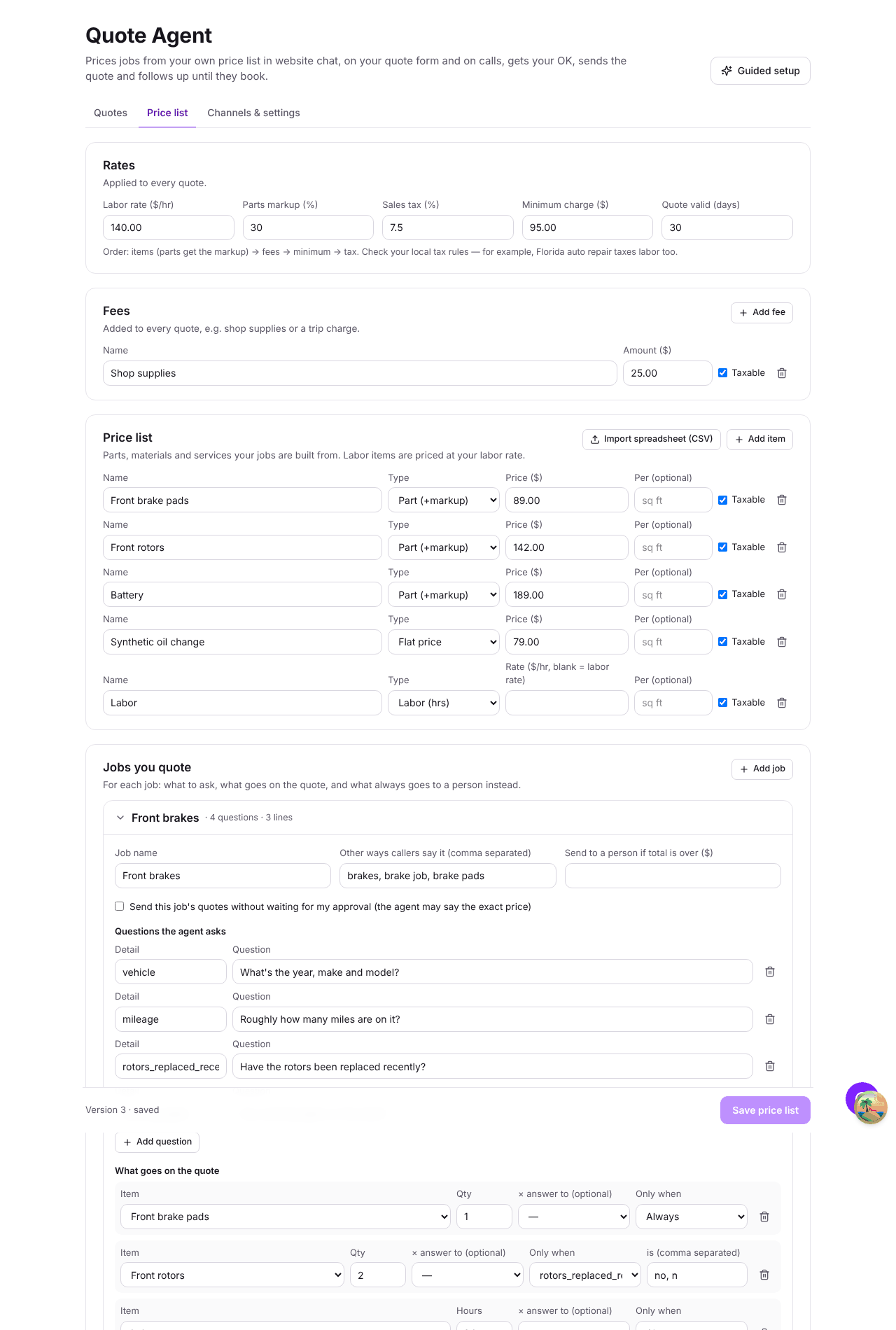
Rates
| Setting | What it does |
|---|---|
| Labor rate ($/hr) | The price of one hour of labor. |
| Parts markup (%) | Added to the price of every item of type Part (+markup). |
| Sales tax (%) | Applied to taxable lines after everything else. |
| Minimum charge ($) | If a quote comes to less, it's topped up to this amount. |
| Quote valid (days) | How long the customer has to accept. |
Fees
Fees are added to every quote — a shop-supplies fee or a trip charge, for example. Each fee has a name, an amount and whether it's taxable.
Items
Items are the things you charge for. Each has a name, a price, a type and an optional unit ("per sq ft", "per yard"):
- Part (+markup) — your cost; the markup is added on the quote.
- Labor — priced at your labor rate, so it has no price of its own.
- Flat price — a service at a fixed price, such as an oil change.
To add many at once, click Import spreadsheet (CSV) and choose a CSV file with the columns
name, price, type, unit.
Jobs you quote
A job is something a customer asks for — "front brakes", "interior painting". For each job you set:
- Job name, and Other ways callers say it — "brakes, brake job, brake pads". The agent matches what the customer says against both.
- Questions the agent asks — each question collects one answer, such as the vehicle or the square footage. The agent won't price the job until it has every answer.
- What goes on the quote — the lines. Each line is an item and a quantity. A quantity can come from an answer (× answer to square footage), and a line can be added only when an answer matches (add rotors only when "rotors replaced recently" is no).
- Always send to a person when… — conditions that stop the agent pricing and send the quote to you as Needs inspection (for example, a warning light is on).
- Send to a person if total is over ($) — a ceiling. Anything above it comes to you without a price being given.
- Send straight to the customer — skip your approval for this job. Use it for simple, fixed-price work.
Anything a customer asks for that doesn't match a job is never guessed at — it comes to you as Needs inspection. Start with your most common jobs and add more as they come in.
How a total is calculated
- Each line: quantity × price. Parts get your markup; labor uses your labor rate.
- Fees are added.
- If the subtotal is under your minimum charge, it's topped up.
- Sales tax is added on taxable lines.
Every amount is worked out to the cent. On a call or in chat the agent says a range rounded to the nearest $50 either side ("roughly $800 to $850"); the written quote shows the exact total.
Test a price
The Test a price panel prices a job with the answers you type, using the list on screen — including changes you haven't saved yet. Use it after every change.
Saving changes
Click Save price list to publish a new version of your price list. New quotes use it straight away. Quotes already created keep the prices they were made with, so a price change never alters a quote a customer is looking at.