Quote Agent
An AI agent that prices jobs from your own price list on your website, your quote form and the phone — and sends each quote once you approve it.
The Quote Agent answers "how much will it cost?" for you. Customers ask in your website chat, fill in your quote form, or call your number. The agent asks the questions your price list needs, works out the price from your rates, and sends you the quote to approve. Once you approve, the customer gets an itemized quote by email and text with a link to accept it.
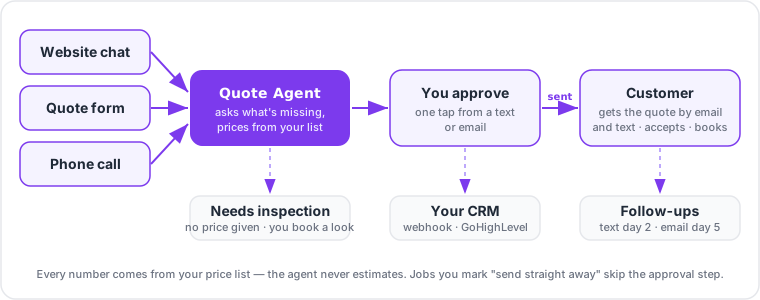
How a quote comes together
- The customer asks. Through your website chat, your quote form, or a phone call.
- The agent collects the details. It asks only the questions your price list sets for that job — for brakes, say, the vehicle and whether the rotors were replaced recently.
- The price is calculated, not guessed. Chatley adds up the lines from your price list: parts with your markup, labor at your hourly rate, your fees, your minimum charge, then sales tax. The agent never invents a number.
- The customer hears a range. On a call or in chat the agent gives a rounded range ("roughly $800 to $850") and tells them a written quote is on its way.
- You approve. You get a text and an email with the full quote. Approve it, edit the lines, or send it back — from your phone, without signing in.
- The customer gets the quote. An itemized email and a text with a link to view it and Accept or Decline. You're told the moment they answer.
If a job isn't on your price list, or something the customer says means it needs a look first (a warning light, a price over your limit), the agent doesn't give a price. The quote comes to you as Needs inspection so you can price it yourself.
A worked example
Torque Auto Service charges $140 an hour, adds 35% to parts and a $25 shop-supplies fee, and charges 7.5% sales tax. Dana calls about squealing front brakes on a 2019 Ford F-150.
| Line | Qty | Price | Amount |
|---|---|---|---|
| Front brake pads | 1 | $115.70 | $115.70 |
| Front rotors | 2 | $184.60 | $369.20 |
| Labor (hr) | 1.8 | $140.00 | $252.00 |
| Shop supplies | 1 | $25.00 | $25.00 |
| Subtotal | $761.90 | ||
| Tax (7.5%) | $57.14 | ||
| Total | $819.04 |
On the call Dana hears "roughly $800 to $850". The shop owner gets a text, taps Approve & send, and Dana receives the written quote for $819.04.
Where to find it
Open your workspace and choose Quote Agent under Engage in the sidebar. The first time, Chatley walks you through guided setup. After that the page has three tabs:
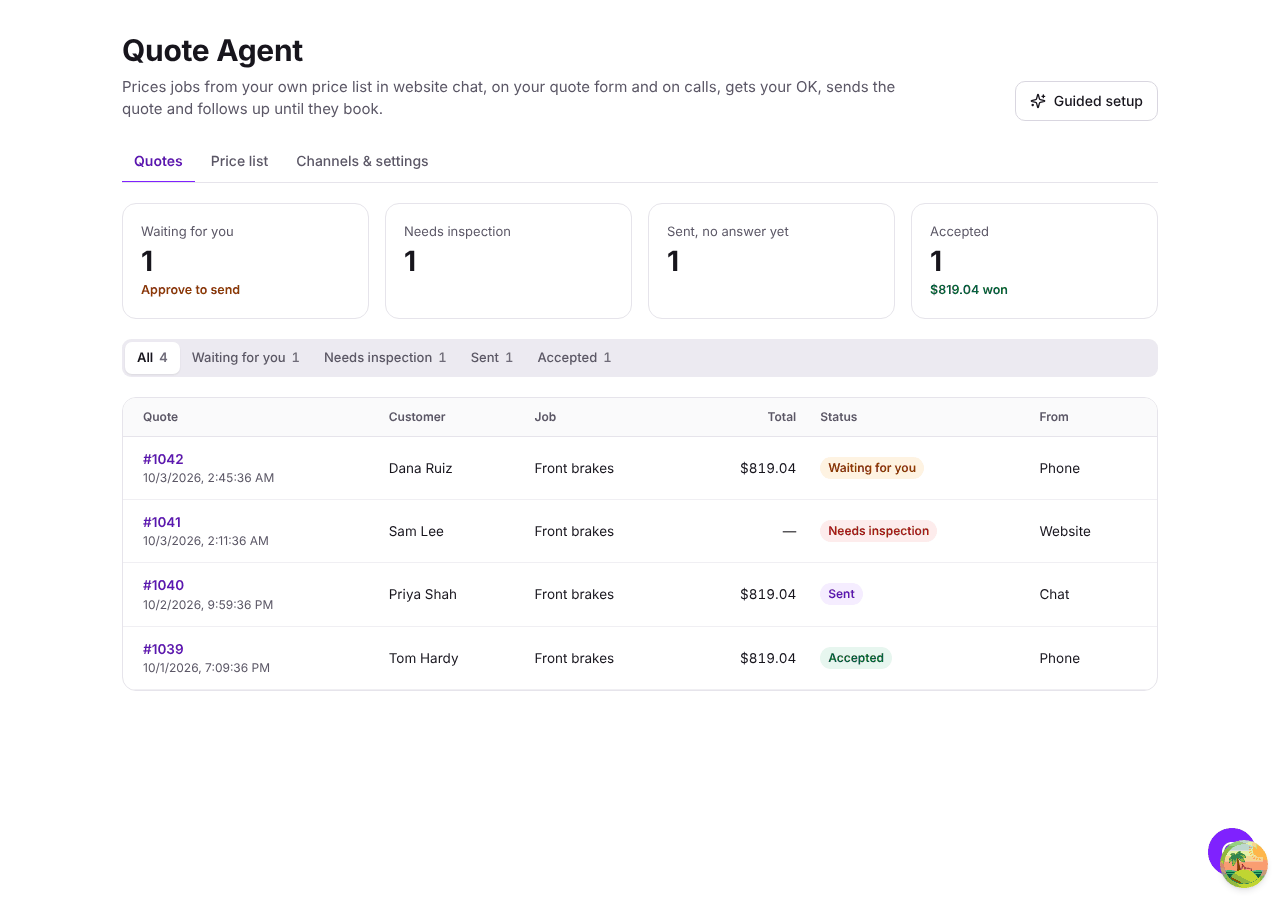
- Quotes — everything waiting for you, sent, accepted or declined. See Approving quotes.
- Price list — your rates, fees, items and the jobs you quote. See Price list.
- Channels & settings — website chat, quote form, phone, approvals and your CRM. See Channels and CRM & webhooks.
Next steps
- Set up your Quote Agent — about five minutes.
- Ask Ikora to set it up for you.
- Follow up on quotes automatically.